

Programs & Registration



Registered programs provide the public with the opportunity to participate in a pre-defined set of activities that are instructor-led. There is a variety of specialized programs offered each season!
- There is a learning progression from the start to the end of the program
- Pre-registration and payment are required at the time of registration
- Access to these programs is not included with daily general admission
Drop-in classes occur at the Canada Games Centre (CGC) and offer the flexibility to join a program at any point.
- Pre-registration is not required as entrance is on a first-come basis. Some classes have a maximum number
- Drop-in programs are participant-led (e.g. Basketball) or Instructor-led (e.g. Aquafit)
- Access is included with general admission or monthly or annual membership (a wrist band is required to access a drop-in program)
View the Canada Games Centre Schedule.

Kids Recreation Fund
668-4236 sportyukon.com
Supports sport and recreation for children 18 or under. Families may qualify for up to $400 yearly per child.
Canadian Tire Jumpstart
jumpstart.canadiantire.ca
Funding is available to support children aged 4 to 18 years participating in sport and recreation.
Raven Recycling Club
ravenrecycling.org
Open to children aged 4 to 16 years. Collect refundable beverage containers and bring them to your local depot to earn points that can be exchanged for prizes, including a 10-admission youth pass or 1-month youth membership to the Canada Games Centre.
Here are some terms and information that are important to understand as you prepare to register:
- Program fees displayed in the guide are before taxes
- Participants must meet the age requirements and have achieved all pre-requisites to register
- Individuals may waitlist for a program that is full. If space becomes available, you will be contacted by email and given 24 hours to register either in person or by phone
- All foods containing nuts are not permitted in our programs
- Payment plans are offered on any program $100 and over and are only available in person or by phone at the time of registration. A valid Mastercard or Visa must be on file under Financial Information.
1. Check out what to know before registration
2. Browse seasonal course offerings in advance
3. Choose the courses you or your family would like to take
4. Lottery register (beginning of the season) or register for your courses Online or In person at the Canada Games Centre (during hours of operation)
5. Follow the prompts to add a course to your cart and click “Checkout”
6. Enter payment. Once you have clicked ‘process payment’, your transaction is in process. Be patient and wait for the transaction to complete. If you click again, refresh or press the back tab, you may be charged multiple times, loose your transaction or cause an error in the system.
Having trouble using Perfectmind? Make sure you have the latest version of chrome, clear your browsing history and login into only one device.
We know you want to have your best chance at getting into our popular programs, however, when you log in to multiple devices or tabs and attempt to register the same person from multiple devices this often causes errors in the system.
All course registration will be done by lottery.
Lottery Registration Period: March 2-3
- Lottery Register for any course you are interested in during this time.
- Do not register into any lotteries you do not want to win.
Prioritization: All Aquatics courses and Purple Stew use priorities. Rank your choices carefully. If you win multiple lotteries, you will be removed from any lower ranking course.
Lottery Results: March 4
You will receive an email from [email protected] with one of the following subjects:
- “Pending Confirmation Details” — you have a pending spot.
- “You Have Been Added to a Waitlist” — you are on the waitlist.
You can also check results under “Attendance” in your PLAY account.
Confirmation of Pending Spots begins on March 4 at 12 pm.
Please note: Email confirmations will arrive in your inbox as early as 9 am but courses will remain closed for registration until 12 pm.
- If you receive a pending spot, you must confirm and pay within 24 hours (online, in person, or by phone) or you will be automatically withdrawn.
- After lotteries are processed*, remaining spots and waitlists will open for general registration.
- Once a spot is confirmed, withdrawal fees apply.
Why Courses May Appear to Have Open Spots When They’re Actually Full
Sometimes our registration system may show that a course has available spots, but when you try to register, it says the course is full. This happens because the system is holding spots for participants who have received a pending confirmation and are within their 24-hour window to complete registration. Until that window expires for all participants offered a pending spot, those spots are temporarily reserved. It can take a day or two for these pending registrations to clear, so we recommend checking back regularly in case spots open up.
- When you register for multiple courses of the same type (i.e., Swimmer 2 or Purple Stew), you’ll need to rank your choices from first to last — your first choice being the one you most want.
- When the lottery runs, if you “win” spots in more than one course, you’ll be removed from lower-ranked options and keep only your highest-ranked course. This helps ensure everyone gets a fair chance at their preferred class.
Some participants may need extra support to take part in recreation activities. This may include participants with physical, developmental, intellectual, visual, or hearing disabilities, as well as those who need help with attention, behaviour, or personal care. If you requires one-on-one support to attend a program, please contact our team prior to, or at the time of registration, to discuss your needs.
- Required program forms or waivers must be submitted prior to the program start
- If the participant carries an Epi-Pen, the Anaphylaxis Emergency Plan must be filled out
- All courses are non-refundable within 7 days of course start date.
- Courses withdrawn prior to 7 days are subject to a $30 withdrawal fee.
- If the course fee is less than $30, only the course fee is charged and no balance is refunded
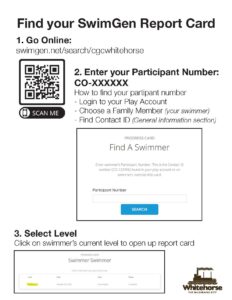
Find your online Swim Report Card
- Go Online: swimgen.net/search/cgcwhitehorse.
- Enter your Participant Number: CO-XXXXXX*.
- Select your Level.
* Find your Participant Number (Contact ID )
- Login to your PLAY account.
- Click “My Info” and choose applicable family member.
- Under General Inforamtion find your Contract ID (CO-XXXXXX).
click image for full size pdf